Showing posts with label Router. Show all posts

Thursday, 19 January 2012

Machine Production Techniques - Lesson Eight

I spent the beginning of the day fitting the drawers and making a wooden base. Fitting the drawers was simple but time consuming, and the drawer base is used as the drawer stop. The base was made out of a piece of wood which was the same size as the base, and then cut with 2/3rds on one side, and one 3rd on the other. This meant that there is a base for one side to sit on whilst shut, and an equal base to fix wheels into place.

Above: Drawers fitted and base installed.
I then decided to go buy some extras for the toolbox during lunch. This included wheels, a hasp, a lock and also another hinge. When I got back, the first thing was to fit the wheel. There are six wheels in total, four for the big base, and two for the small base. Two of these wheels are lockable, so you can stop it from moving.
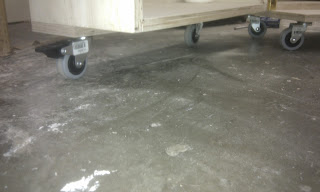
Above: Wheels fixed to the base of the toolbox
After fitting the wheels, I then added the hasp and lock.

Above: Hasp and Lock
After I completed these tasks, I decided to make my own modifications, as the wood for the table had not come in. The first thing was to fit a hinge and cut a door inside the cabinet. This is going to be used to hold my chisels in a rack that I made. I drilled a handle in the top left hand corner, similar to the drawer handles.
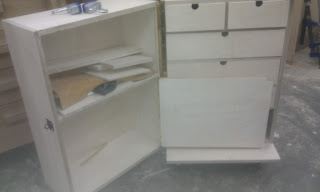

Above: Inside door hinged.

I then began work on the chisel holder. I started by marking out and drilling holes the size of each chisel (as they were all slightly different). I also added two extra holes for any chisels I might get in the future. Then using the band saw I cut slots to each hole to slide the chisels in.
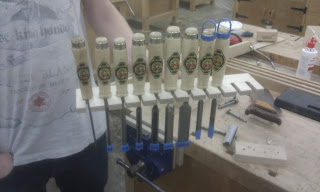
Above: Chisel holder with chisels.
I originally planned to fix this to the back of the door, however I then thought it would be better if I could take the chisels all out at the same time and put them onto the bench. Therefore I made a free standing chisel holder.
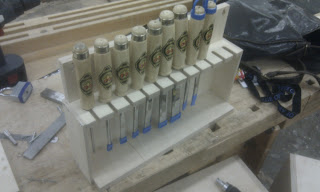
Above: Free standing chisel holder
I then made two drop screw holes in the chisel holder, and put two screws into the back of the door. This allows me to hang the chisels securely, but also take them out whenever required.
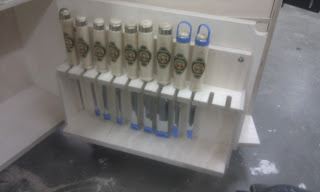
Above: Chisel rack fitted to door
Finally I made two saw holders on the back of the cupboard, so they wouldn't get damaged in a drawer, and are easily accessible.
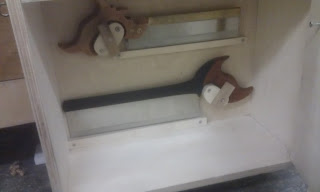
Above: Saw holders.
Overall for this part of the module things went relatively smoothly, and allowed me to use the basic machines in the workshop. I am glad I had time to customise my own side of the toolbox which was not limited to the module requirements, as I will be using it for many years to come, and do not know if I would have time in the future.


Wednesday, 18 January 2012

Machine Production Techniques - Lesson Seven

Today lesson was spent cutting, fitting and gluing the drawers together. I first cut all the pieces for each drawer, and then fitted the fronts to each gap. 

Above: Fitting fronts to each gap
Once all the pieces were cut to the right length, I setup the router table to make all the grooves. However I cut grooves on some edges that didn't need them, so I had to cut them down, making the drawers smaller.

Above: Drawer with grooves and handle
Once I had grooved the drawers, I used a jig and the pillar drill to make the handles, and then clamped and glued them together. I tried to panel pin one of them, however all pins split the wood, and so I decided just to clamp them instead. Whilst the drawers were drying, I decided to cut and fit the hinge. This also included routering a groove so the box shut flush.

Above: Hinged together
I left the drawers to dry during the night, so will work on them when I get in tomorrow.


Thursday, 12 January 2012

Machine Production Techniques - Lesson Six

After yesterdays lesson, the box was ready to be routered open. To do this, I first went to the metal workshop with another student to cut some metal bars to fix the guides to either side of the box. 


Above: Shows the metal bars holding guides in place
Because of the size of the toolbox we decided to work in pairs, and we split the boxes whilst another person was holding them in place. This made it much easier and safer to use the router.

Above: Router set up with extraction
After the box was split in two, I then cut the pieces for the dividers, and using a biscuit jointer created slots in each end, to slide them into place.

Above: Pieces cut to length

Above: Slot shown in place cut using biscuit cutter
For the end of this lesson I glued the dividers into place, ready to cut the drawers pieces to size.


Wednesday, 11 January 2012

Machine Production Techniques - Lesson Five

We are back from Christmas, and carried on with the toolbox. The deadline is looming, as it has to be finished by the 19th, and I am know spending more and more time working on it. In this lesson I worked on a lot of things, and progress was fast.

I began by routeing out two grooves for a hardwood inlay, as this is where the hinge will be screwed into. I also marked out, cut and glued in where the biscuits would be by using a jig and a biscuit cutter.

Once I had done this, I was ready to do a dry test to make sure it fitted together, before I glued it.
Test dry fitting the toolbox carcass together
Clamping the toolbox up was quite a complicated task, so I got help from others around me. I added a couple of other clamps where the wood was slightly warped and not sitting correctly.

Toolbox clamped up ready for tomorrow
This means that the toolbox will be ready to be routed into two parts tomorrow, and that I can then start to create the shelves and dividers.

Thursday, 15 December 2011

Machine Production Techniques - Lesson Four

This lesson was the last before the Christmas break, and I was eager to get as much completed as I possibly could. My next task was to create the grooves and rebates for the top, back, sides, front and back to slot into. To create theses grooves I used a hand router and also the overhead router.

Piece of wood with groove created by hand router 
These grooves took most of the lesson, as there were a limited number of routers available, so I had to wait till one was free.  The last thing that I did was to cut the front and back panels and then create a rebate on all the edges.

The hardest part of this lesson was getting comfortable with using the router, as I found it hard to control it on some of the edges. After this though, it was an easy and straight forward lesson. 

Wednesday, 14 December 2011

Machine Production Techniques - Lesson Three

This lesson was the lesson when we cut all the wood for the toolbox carcass, and to do this we used the dimension saw, and worked as a class.

The main problem with working like this was the amount of time it took. This meant that cutting the panes which could have taken twenty minutes took over two hours. The advantage of this though was that all the pieces would be identical and cut to the correct size. After the wood was cut I labelled it up ready for tomorrow's lesson when I would start to groove and rebate the panels.

Thursday, 8 December 2011

Machine Production Techniques - Lesson Two

This lesson was all about the different machines in the workshop. I didn't have time to take any photos as we were working in groups, but we all used every machine that would be needed in this module.

The machines we were inducted on were, the cross-cut saw, the ripsaw, the surface planer, the thickness planer, the band saw, the disc sander, the bobbin sander.

All the health and safety was written in a very helpful booklet, which allows me to use it at any time whilst in the workshop.

This lesson was very useful, as it now means that I know how to use each machine properly and safely whilst working on any modules in the future. 

Wednesday, 7 December 2011

Machine Production Techniques - Lesson One

This was the first lesson for Machine Production Techniques, and we began by having a module briefing.

In the module briefing we spoke about what was required for the toolbox and also about the table with a drawer. After we received a booklet with information about the module, we learnt about how to set up and use a router.

The first thing was how to put a cutting piece into the router. To begin with you first lock the cutter into place using the press button, and then using a spanner undo the bolt.


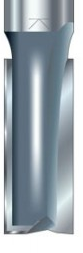
Once the bolt is done, you can then put the cutter piece into the router. You simply slide it inside the bolt. One important thing is to make sure you go to at least the flat line pictured on the cutter, so you can not see the arrow head. Finally you just had to re-tighten the bolt to thumb pressure.
Minimum cutter depth
Once this was in place, we then learnt how to start the router. This is simply done by the right hand. To start you have to push the safety switch down with your thumb, and then pull in the finger trigger towards you. You can also lock the router on so it stays on at all time, and this is done by applying some more pressure to the thumb trigger and then realising it.  

Right handle with thumb and finger trigger.
I then learnt another important thing when using a router, and that is the direction of cut. This means that when you are creating a rebate you want to be pushing it into the material, to stop it from catching the material and tearing the material. This can cause the router to jump towards you, and be very dangerous. The direction is clearing shown on the base of the router.

Direction of cut shown on the base of the router
I then learnt the way to set the router for certain cuts, and this includes the depth of the cut. TO plunge the router into a material, you first realise the left handle by twisting it, and this then freely moves the router up and down. You then twist the handle again to lock it into place.

Arrows showing twisting motion of handle
 You can also set the depth using a depth stop, this is done by realising a wing nut on the side, and then twisting the bar to the bottom, this can be re-zeroed depending on different cuts.

adjusting screw

 You can also place the object that your rebating underneath the bar, so you easily cut to the right height.

Area where you can place certain objects
Finally I learnt about the fence that you put on the router, and this allows you to make parallel cuts at any distance from the edge of the piece of wood.

Router with fence attached
The first day was interesting as we learnt about the module, and also how to correctly set up a router, the hardest part was to learn how to lock the router so it would carry on when you realised the trigger.